How to use GLM-5 with OpenCode in GitHub Actions

If you want to use your own coding agent in CI/CD like GitHub then OpenCode is one of the best options to use it which is also open source.
Let’s see how to use GLM 5 from z.ai coding plan in this blog post.
Step 1: Configurations
Make sure that you’ve configured API key in Github Actions which you can do via repo’s setting.
In our case, we’ll configure it as ZAI_API_KEY
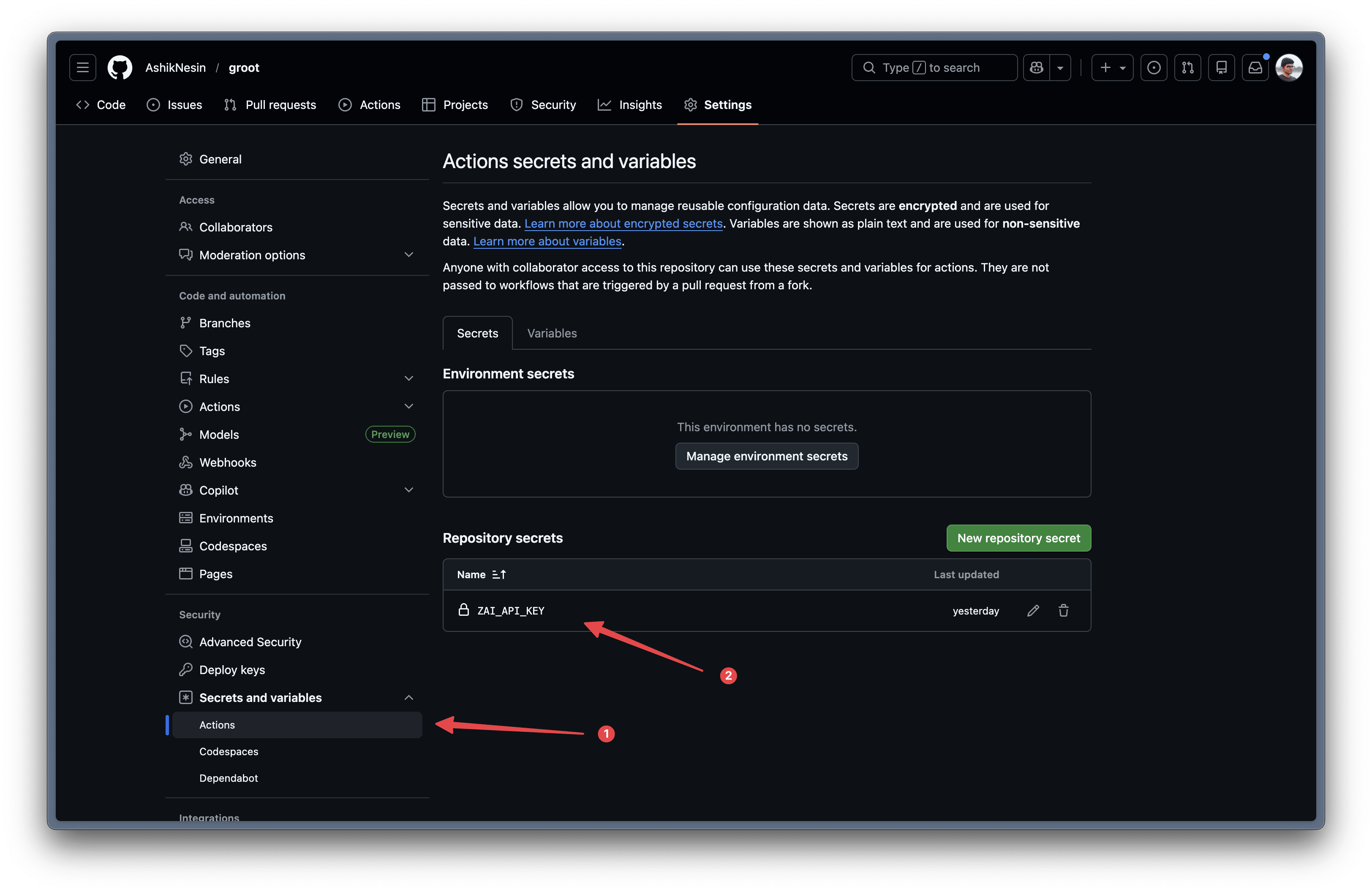
And make sure in the root of the repo that you’ve a opencode.json file which will be used by the opencode when it is running the coding agent.
In that file, you need to define the models that you’ll be using and the needed configurations
{
  "$schema": "https://opencode.ai/config.json",
  "provider": {
    "zai": {
      "npm": "@ai-sdk/openai-compatible",
      "name": "zai",
      "options": {
        "baseURL": "https://api.z.ai/api/coding/paas/v4",
        "headers": {
          "Authorization": "Bearer {env:ZAI_API_KEY}"
        }
      },
      "models": {
        "glm-5": {
          "name": "GLM-5"
        },
        "glm-5-turbo": {
          "name": "GLM-5-Turbo"
        },
        "glm-4.7": {
          "name": "GLM-4.7"
        }
      }
    }
  }
}
Step 2: GitHub Workflow
And you can use it in your workflow like this.
In the below example, we are using AI to intelligently keep the codebase up to date with the boilerplate.
name: Groot Sync

on:
  schedule:
    - cron: "30 6 * * *" # 12PM IST (6:30 AM UTC)
    - cron: "30 18 * * *" # 12AM IST (6:30 PM UTC)
  workflow_dispatch: # Manual on-demand trigger

permissions:
  id-token: write
  contents: write
  pull-requests: write

jobs:
  groot-sync:
    runs-on: ubuntu-latest
    timeout-minutes: 10
    steps:
      - name: Checkout repository
        uses: actions/checkout@v4
        with:
          fetch-depth: 0
          persist-credentials: false

      - name: Run OpenCode Sync
        uses: anomalyco/opencode/github@latest
        env:
          ZAI_API_KEY: ${{ secrets.ZAI_API_KEY }}
          GITHUB_TOKEN: ${{ secrets.GITHUB_TOKEN }}
        with:
          model: zai/glm-5
          use_github_token: true
          prompt: |
            Run the /groot-sync skill to sync infrastructure files from the groot boilerplate repository.

            CRITICAL PRESERVATION RULES:
            - Never override project-specific business logic, routes, or features
            - Only sync infrastructure/utility patterns (error handling, logging, middlewares)
            - If the project has REMOVED or MODIFIED boilerplate defaults (schema, routes, seed data), do NOT re-add them
            - Check git history to distinguish intentional removals vs pending updates
            - When in doubt, ask before overriding

            ## Package.json Sync (AI-Powered)

            When package.json has changes, use AI to intelligently sync dependencies:

            1. AUTO-APPLY infrastructure dependencies (build tools, testing, core utilities)
            2. SKIP feature-specific packages (stripe, email providers, optional cloud SDKs)
            3. FLAG major version bumps for review in PR description
            4. NEVER remove dependencies that exist locally but not in boilerplate

            Infrastructure packages to auto-apply: typescript, vite, esbuild, vitest, zod, express, react, prisma, @radix-ui/*, tailwindcss, pino, bcryptjs, jsonwebtoken

            Follow the sync process from .agents/skills/groot-sync/SKILL.md:
            1. Check what changes are available by running `./.groot/sync.sh`
            2. If there are changes, apply them following the sync config in .groot/boilerplate-sync.json
            3. Update `.groot/boilerplate-sync.json` with the new commit hash after applying

            Branch: `chore/groot-sync`
            - If branch doesn't exist: create it and open a PR against main
            - If branch exists with open PR: update the same branch (PR updates automatically)
            - If no changes needed: exit successfully without creating PR

            The boilerplate repo is: https://github.com/AshikNesin/groot

Or if you want to use it for code review you can do it like this
name: opencode-review

on:
  pull_request:
    types: [opened, synchronize, reopened, ready_for_review]

jobs:
  review:
    runs-on: ubuntu-latest
    permissions:
      id-token: write
      contents: read
      pull-requests: read
      issues: read
    steps:
      - uses: actions/checkout@v6
        with:
          persist-credentials: false
      - uses: anomalyco/opencode/github@latest
        env:
          ZAI_API_KEY: ${{ secrets.ZAI_API_KEY }}
          GITHUB_TOKEN: ${{ secrets.GITHUB_TOKEN }}
        with:
          model: zai/glm-5
          use_github_token: true
          prompt: |
            Review this pull request:
            - Check for code quality issues
            - Look for potential bugs
            - Suggest improvements