How Do I Tell AI Agents Exactly Which UI Element to Change?

Agentation allows you to easily add visual feedback in the frontend. Once you’ve added the needed feedbacks, you can just copy them in one go.
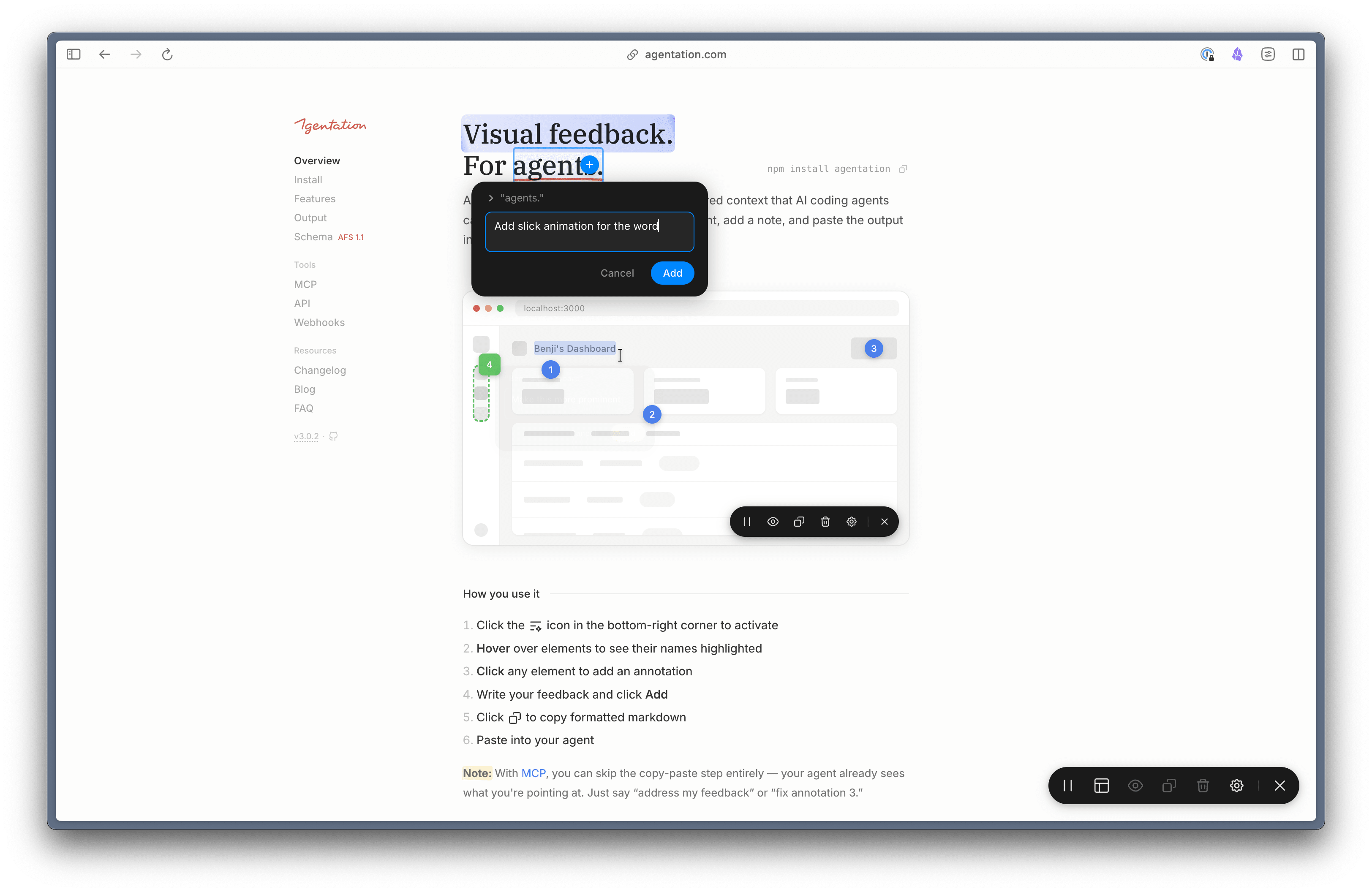
How to get started?
npm install agentation -D
And then add it in your app
import { Agentation } from "agentation";

function App() {
  return (
    <>
      <YourApp />
      {process.env.NODE_ENV === "development" && <Agentation />}
    </>
  );
}
Make sure that you’ve enabled it only in development mode alone.
Once that’s done. You’ll be seeing an widget to add feedbacks in your web app.
The feedbacks will be something like this which you can pass it to your AI agents
## Page Feedback: /
**Viewport:** 1492×892

### 1. "agents."
**Location:** header > .heading-container > h1 > .pen-underline
**Source:** _next/static/chunks/app/layout-59af6aa2ff365102.js:1:265623
**Feedback:** Add slick animation for the word
Instead of copy-pasting the feedbacks, you can also use the MCP to handle that for you
npx add-mcp "npx -y agentation-mcp server"